For co-writing a novel in real time, Plotiar, Google Docs, Word for the web, Reedsy Studio and Dabble all show each author's edits live. Reedsy Studio and Google Docs are free, but Reedsy gives every invitee full edit rights and Docs has no novel planning. Plotiar adds editor and viewer roles and shared planning, and only the project owner pays, $5/month. Dabble charges every co-author from $19/month.
No live editing: changes by others don't appear immediately
Price (as of 2026-09)
Inviting needs Specialist, $20/month; each editor needs at least Scribe, $4/month; viewers are free
Platforms
Web browser only
How to choose
What matters when you choose
Four questions decide which app fits two or more authors:
Do edits appear live for everyone, or only after a sync?
Who has to pay: only the person who invites, or every co-author?
Can you control who edits and who only reads?
Do the plans, notes and story bible live next to the shared manuscript?
The options
Each option, honestly
Plotiar
Best for: co-authors who want to plan and draft the same novel together, with one paid seat.
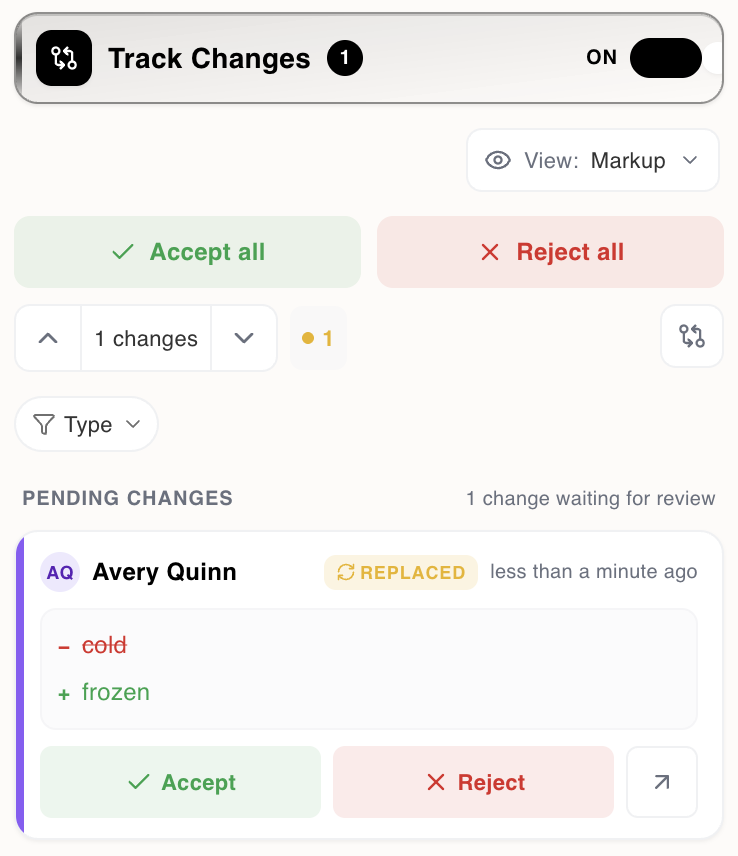
In Plotiar, everyone in a shared project sees each other's cursors and edits live. The project owner invites co-authors as editors or viewers, and invited people can stay on the free plan. Comments and track changes keep each review round in one place, and you accept or reject each change in a review panel. Shared planning tools such as the plot grid, corkboards and Lore, the story bible, sit in the same project.
Where it falls short: The project owner needs Plus to invite anyone.
Track changes in Plotiar: each change is marked, ready to accept or reject.
Google Docs
Best for: zero-cost co-writing when you don't need novel planning tools.
Google Docs is the default shared document: free, widely used, with live co-editing, comments and suggestions. Anyone with a Google Account can join, so there is no setup for your co-author.
Where it falls short: One document holds up to 1.02 million characters, and there are no novel tools. Document tabs can split one file into chapters and notes, but plans and boards end up in separate files.
Best for: co-authors whose editor or publisher works in Word.
Word for the web lets several people write, read and collaborate in real time from any device, with Word's comments and track changes. The free version needs only a Microsoft account.
Where it falls short: Live co-editing works on files stored in OneDrive or SharePoint (and some partner services), and like Google Docs it has no planning tools for a novel.
Best for: free co-writing that ends in a formatted ebook or print PDF.
Reedsy Studio is a free, browser-based book editor with real-time collaboration. Its free core also formats the finished book and exports professional PDF and EPUB files.
Where it falls short: Anyone you invite gets full edit rights, and its planning is limited to card boards, with one board on the free plan.
Best for: two authors who both already pay for Dabble and often write offline.
Dabble's co-authoring keeps everyone's copy of the project in step in real time, and when someone writes offline it merges the changes rather than picking a winner. Writer allows up to 5 co-authors, and Author and Bestseller allow up to 100.
Where it falls short: Each co-author's access depends on their own Dabble subscription, so two writers pay $38/month between them on monthly Writer plans (about 20% less billed yearly).
Best for: passing a draft back and forth, not writing at the same time.
Novelcrafter can share a novel with editors and viewers, and its Codex story bible is strong for series. But its own help pages say you will not see changes made by others immediately, and that they don't recommend working on the novel at the same time.
Where it falls short: It is not real-time co-writing, and both the person inviting and each editor need a paid plan.
Neither of you needs planning tools and you want zero cost. Google Docs and Word for the web are free and familiar.
You want a free path from a shared draft to a formatted ebook. Reedsy Studio formats and exports PDF and EPUB at no cost.
You both write offline a lot and already pay for Dabble. Dabble merges offline edits.
Your publisher requires Word files with Word's own track changes. Word for the web keeps everything in that format.
Questions
Questions about co-writing apps
Short answers, with the facts as of September 2026.
Plotiar, Google Docs, Word for the web, Reedsy Studio and Dabble all show co-authors' edits live. Novelcrafter does not: its help pages say you will not see changes made by others immediately. Facts as of September 2026.
In Plotiar, no. Only the project owner needs Plus ($5/month or $50/year) to invite, and invited co-authors can use the free plan. In Dabble, each co-author needs their own paid plan, from $19/month. Google Docs, Word for the web and Reedsy Studio are free to collaborate in.
For the words, often yes: it is free and edits appear live. The limits show on a long project. One document holds up to 1.02 million characters. Document tabs can hold chapters and notes, but plans and boards end up as separate files. Tools built for novels keep them together.
In Plotiar, yes: with track changes on, every insertion and deletion is marked in the text, each change card in the review panel shows its author's color, and you accept or reject it there. Word for the web has track changes and Google Docs has suggestions. Reedsy Studio also has track changes, but anyone you invite gets full edit rights.
In Plotiar, yes: the plot grid, corkboards, flowcharts and Lore, the story bible, are shared in the same project as the manuscript. Dabble's co-authors share the whole project, including its plot grid and story notes. Google Docs and Word for the web share the text only.
Write the book together, live
Invite your co-author on Plus for $5/month. They can join on the free plan and see every edit as it happens.